See why each school is a Safety, Target or Reach.
With Match AI, every category comes with a plain reason, like your GPA sitting 0.20 above the admitted-class average. No black boxes.
Planning signals—not acceptance odds.FROM “WHERE SHOULD I APPLY?” TO A PLAN.
Explore every PA program and satellite campus in the U.S. Then watch seven progress bars fill as you go: schools, GPA, prerequisites, hours, letters, deadlines and essays. Your planner shows exactly what to work on next.
Listings checked weekly against ARC-PA and official campus sources.
Free Starter includes 3 saved schools.
No credit card. No transcript needed. Setup is optional.
About 8 credits of A’s (roughly 2 classes) would bring your science GPA to 3.20 at Sample program B.
Built by The PA Life + PA School Finder.
Your research and your application work, connected.
YOUR NEXT STEP STARTS HERE.
New here or returning? Continue with Google or your email below.
Development sign-in · This is a test environment, not the public launch. Use fictional information while testing.
Opening a recommendation request? Use the email address that received your invitation.
No new account needed. Open your planner to continue your plan or save your first school.
Continue to my plannerOne planner account keeps your saved work together across devices. Add a school first; fill in courses, experience, and preferences when you’re ready. When you create an account, Stephen will email you planner tips and updates when PA programs change their requirements. Unsubscribe anytime.
Already bought Match AI? Find your results and included access before buying again.
Beta guide, privacy & helpSEVEN STEPS. ONE READY APPLICATION.
Your dashboard tracks the seven parts of a strong PA application. Each bar fills from real progress, never from busywork.
Coming from a program’s planner link on PA School Finder? Your selected program will be waiting after sign-in. You choose whether to save it.
YOUR RESEARCH SHOULD LEAD SOMEWHERE.
A clearer school search, backed by the work you’ve already put in.
With Match AI, every category comes with a plain reason, like your GPA sitting 0.20 above the admitted-class average. No black boxes.
Planning signals—not acceptance odds.Use your saved planner answers for new Match AI analyses. Bring in supported answers from the free Match tools and GPA calculator, with a review before anything changes.
Your edits stay under your control.Below a school’s minimum? See what it would take—credits of A’s, weeks of patient-care hours, the prerequisites still missing—and add those steps to your plan. Your first gap plan is free.
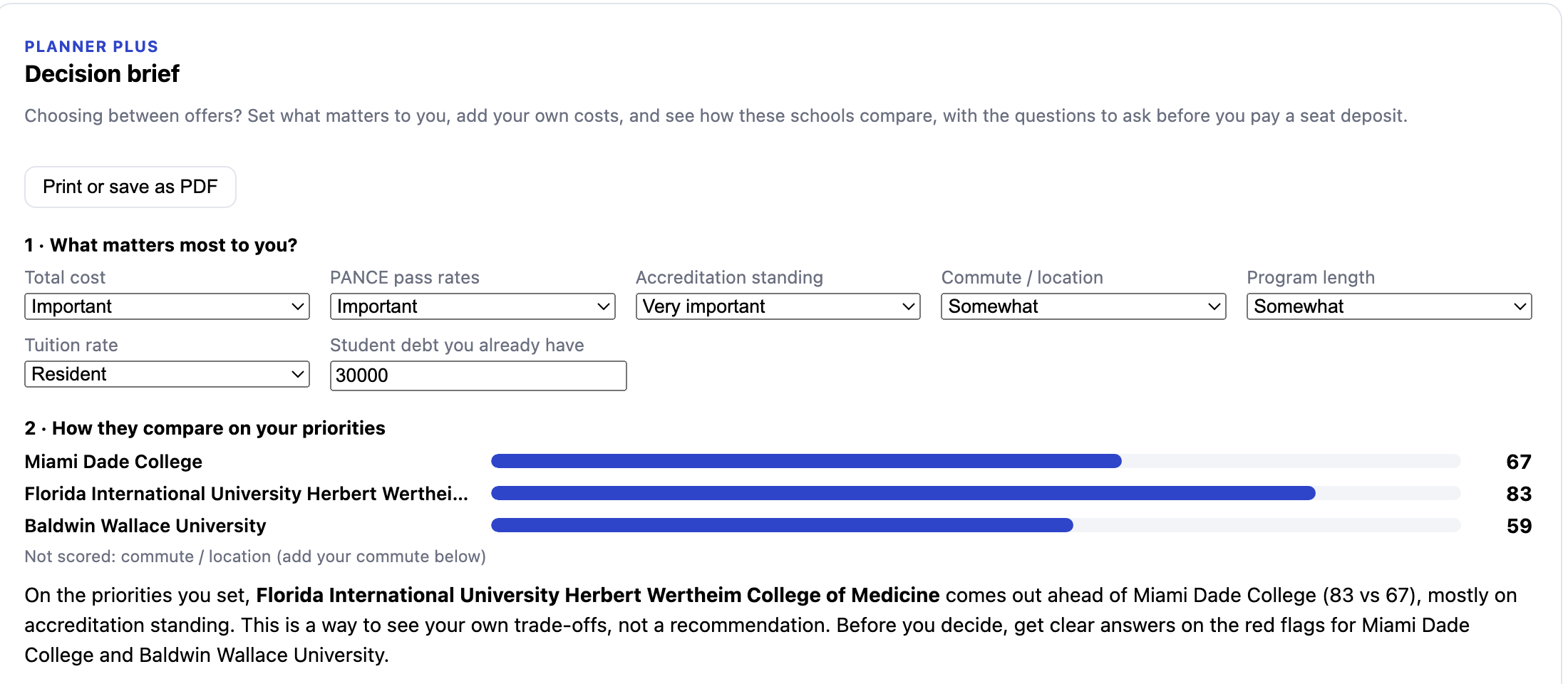
See what Starter and Plus include →Compare your schools on what matters to you: total cost with your own moving and living costs, PANCE results with test-taker counts, and red flags like accreditation probation. Every school comes with the questions to ask before you pay a seat deposit.
Included with Planner Plus.FAMILIAR TOOLS. A CLEAR ROLE FOR EACH.
You’re in the right place. The planner is where you keep working on your plan—not another report you have to start over.
Your public starting point for researching schools. The planner uses PA School Finder’s maintained, versioned program catalog, including campus-specific listings.
Your deeper, dated school analysis. Run it with saved planner answers, keep the report in your account, and compare it with your current plan.
Your ongoing workspace: saved schools, applicant facts, and next steps. Start free without buying Match AI first.
Your selected school or guest shortlist stays with you through sign-in; you choose what to save. An existing Match purchase can be connected in one explicit step to keep its original report, answers, and any included access together. Review original answers before applying them to your current profile.
Supported Match, Match AI, and calculator transfers use an explicit connection and review. They do not automatically sync in the background. Review your answers and choose Save; an analysis or import never silently replaces your school list.
START SMALL. KEEP BUILDING.
No required Match AI run before purchase. No automatic renewal.
Give your school research and application work a home.
Start free without buying Match AI first.
Start my free plannerGo deeper on your schools—and organize the work to apply.
One payment. No automatic renewal.
Get Match AI + Planner PlusSign in, review your access, then buy. Run your analysis when you’re ready—no AI questionnaire before checkout.
Planner AI support20 advisor attempts + 2 document imports
every 30 days while Plus is active
Use your purchase email. Connect your results and check included access before buying again.
Both plans use the same applicant foundation. Plus adds deeper planning and guided support.
| What you can do | StarterFree | Plus$29.99 / 12 months |
|---|---|---|
| Your applicant foundationProfile, manual courses & GPA estimates, experience log | Included | Included |
| Program browsingSearch active listings and read recorded program facts | Included | Included |
| Saved schoolsKeep your shortlist together | Up to 3 | Up to 50 |
| School matchingUnderstand your reported-requirement fit | Basic fit for 3 saved schools | Full-catalog matches |
| Prerequisite planningGo from requirements to your coursework plan | Read recorded prerequisites | Map coursework & compare |
| Choosing between schoolsSide by side, then decide between your offers | Side-by-side program facts | + decision brief: priorities, costs & red flags |
| Dates & deadlinesKnow what comes next | Deadline view | Calendar planning & export |
| Your résuméTurn your experience into an application asset | Automatic text preview | Preview + résumé editing |
| Application workspacesBudget and recommendation planning | Not included | Included |
| AI advisorIncluded provider attempts per 30 days | Not included | 20 attempts |
| AI document importsIncluded provider attempts per 30 days | Not included | 2 imports |
Manual planning, GPA calculations, rule-based matches, and reviewed Match-profile import do not use AI attempts. Maya voice practice is separate; program-change alerts are not included.
Your information, choices, and application stay yours.
No. Create or sign in to your planner account, open Find PA Schools → Match AI, and review your purchase options. You can buy the $29.99 Match AI + Plus bundle first, then run the analysis from your saved answers when you’re ready. Running it needs a recorded cumulative GPA.
You can also start with the free public Match tools. Supported answers can carry into the next tool through an explicit, reviewed connection.
Sign in with the email on your Stripe receipt—not necessarily the optional “Email my results” address. Open Find PA Schools → Match AI. One explicit connection keeps your available original report, original answers, and any included access together. You review original answers before applying them to your current profile.
Qualifying Match AI payments begin September 3, 2026 at 7:40 a.m. PDT. Earlier purchases keep their original terms. Original reports must still be available to connect; a copy successfully kept in your planner stays there until you delete it or your account. If your receipt email differs or a report is unavailable, contact stephen@thepalife.com before buying again.
Current rule-based school comparisons use your saved profile. Match AI reports are dated snapshots: editing your profile does not silently run AI or rewrite a previous report. Choose a new analysis when you want an updated report. The bundle includes an initial report and up to 50 report updates, subject to its access and usage safeguards.
These are planning signals, not admission odds. Unknown requirements remain unknown, and meeting a recorded minimum does not guarantee eligibility or acceptance.
Match AI report updates are separate from Planner Plus’s 20 advisor attempts and 2 document import attempts per 30 days while Plus is active. Those planner attempts reset and do not roll over. Provider attempts count even if they fail; reopening a completed answer does not use another attempt. Daily and service-wide safeguards also apply.
Manual planning, GPA calculations, rule-based matches, and reviewed profile transfers do not use AI attempts. Existing beta and legacy access can have different allowances; your account shows your limits. Review AI suggestions before relying on them.
No. This is one payment for 12 calendar months of Plus from payment, with no automatic renewal or AI overage charges. Your saved data is preserved when Plus ends. Starter remains available with basic fit and deadline tools for up to 3 saved schools; additional saved schools are kept, not deleted. Plus-only tools require active Plus.
Supported school results can be exported as CSV or a Word document you can open in Google Docs. Exports are copies—not a live Google Docs connection. The planner helps you plan, track, and prepare; it does not submit your CASPA application or send recommendation requests for you.
USEFUL SUPPORT. HONEST LIMITS.
The planner is in beta. Try it, tell us what would make your next step easier, and help shape a tool that works for real applicants.
Share feedback or report a problem →The planner supports planning; it does not submit your CASPA application or predict admission. GPA estimates are not CASPA-verified GPAs, and course mappings do not establish prerequisite equivalency. Unknown program information stays unknown. Confirm current requirements, deadlines, costs, and accreditation with each program and ARC-PA.
YOU DON’T HAVE TO FIGURE IT ALL OUT TODAY.
Start with one school. Keep building with the profile, comparisons, and next steps that move your application forward.
Start my free planner Prefer to research first? Browse PA School Finder ↗ Free Starter · Up to 3 saved schools · No credit card required